
A guest follow-up system one volunteer can run
Follow up with church guests on day 1, day 3 and day 10, with sample messages and rules for consent and opt-outs.
On this page
On day 1, thank the guest and answer any question they submitted. On day 3, send the practical next step they asked about. On day 10, offer one personal conversation and let them choose whether to continue. Use the contact method they agreed to, honor opt-outs and ask for texting consent before sending texts.
The guest card goes into a drawer on Sunday afternoon, someone finds it Thursday, the email goes out the following week, and by then the family has visited two other churches or gone back to sleeping in. Nobody publishes a reliable number for how long a first-time visitor keeps a church in view, and this post is not going to invent one. What is measurable is your own side of it: how many hours passed before a person from your church said anything to them, and whether they came back.
The system below takes one volunteer about ninety minutes a month. It requires no software purchase, though it gets easier with one.
First, fix capture
You cannot follow up with people you did not identify. Most churches lose visitors at capture, before follow-up ever starts.
What fails: a clipboard passed down the row, a stand-up-and-be-recognized moment, a card in the seat back nobody mentions, a guest table twenty feet from the door that requires crossing an empty lobby alone.
What works, in order of yield:
- A card everyone fills out. Members and guests both. One line in the service: “Everyone take the card, write your name and one prayer request, drop it in the plate.” Guests fill it out because nobody is being singled out. Churches that switch from guest-only cards to all-congregation cards generally see capture rise, and the honest instruction is to measure your own before-and-after for a quarter rather than trust a percentage from an article, including this one.
- Kids’ check-in. Any family with children under ten gives you a name, a phone number, and an allergy note without being asked twice. Planning Center Check-Ins has a free tier capped at 10 daily check-ins (Planning Center pricing, checked 29 July 2026), and paper labels work fine at under forty kids. Whatever you collect at check-in is a child’s medical and custody information, so read protecting the data a church holds about its members before the tablet goes on the table.
- A QR code printed in the bulletin and on a lobby sign, pointing at a five field form. Name, email, phone, “how did you hear about us,” and a checkbox for “I’d like someone to contact me.” Five fields. Every extra field costs completions.
- A greeter with a pen and a memory. In a church under eighty people, the greeter can write down four names after the service. This works better than any technology at that size.
Do not offer a gift for the card. A visitor who fills out a card to get a coffee mug is not a lead, and the transaction makes the whole exchange feel like a sales floor.
The 72 hour rule
Contact happens inside 72 hours or it does not count. Set the volunteer’s task to Monday morning, one hour, standing appointment.
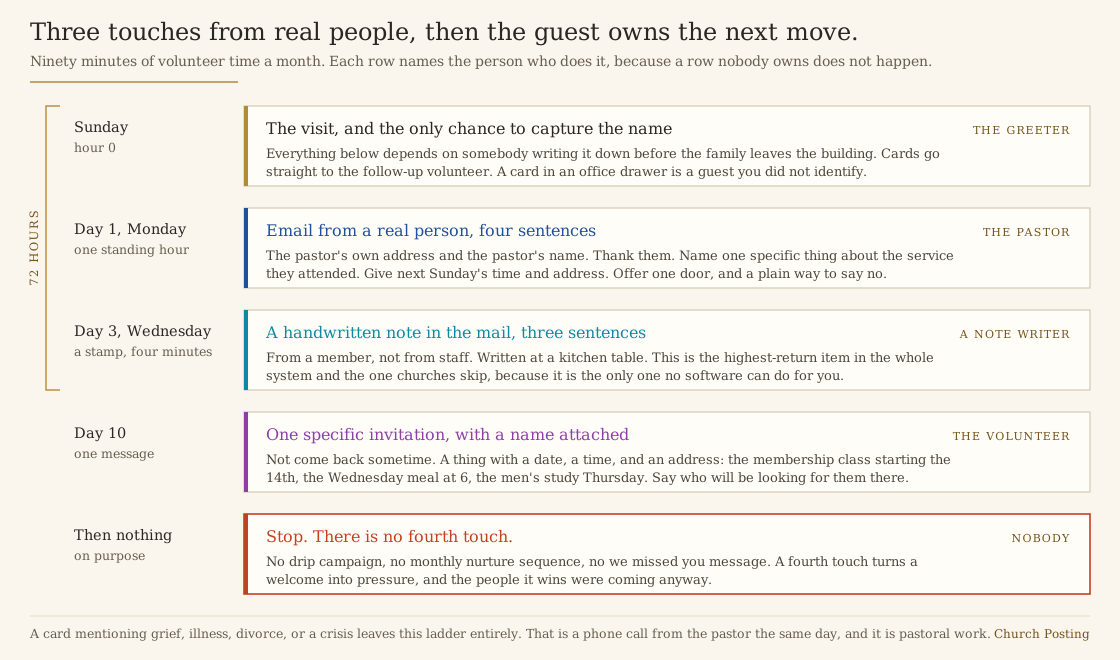
Three touches, then stop. The ladder:
Day 1, Monday. Email from a real person. From the pastor’s address, signed with the pastor’s name, four sentences. Thank them for coming. State one specific thing about the service they attended, such as the passage preached. Give the next Sunday’s time and address. Offer one door: “If it would help, I’m glad to answer questions over coffee, and if you’d rather we not contact you again, reply with the word stop and we’ll take you off the list.”
That last clause matters. It signals that you will respect a no, which makes the yes worth something.
Day 3, Wednesday. A handwritten note in the mail. Three sentences from a member, not staff. This is the highest-return item in the entire system and the one churches skip. A stamped, handwritten card from a member who was glad you came does more than any automated sequence. Cost is a stamp and four minutes.
Day 10. One specific invitation. Not “come back sometime.” Name a thing with a date, a time, and an address: the membership class starting the 14th, the Wednesday meal at 6, the men’s study on Thursday. Include the name of the person who will look for them there.
Then stop. No fourth touch, no drip campaign, no monthly nurture sequence. Three touches from real people, then the guest owns the next move. Adding a fourth touch converts a welcome into pressure, and the people it wins were coming anyway.
Who does what
- The greeter captures names and hands cards to the follow-up volunteer before leaving the building. Cards never go to an office drawer.
- The follow-up volunteer owns the spreadsheet, sends the Monday emails from a template the pastor approved, and assigns the handwritten notes.
- Three or four note writers each receive one or two names a week by text. Give them the cards, the stamps, and the addresses. Four minutes of work, done at their kitchen table.
- The pastor reads every card and personally contacts anyone whose card mentions grief, illness, divorce, or a crisis. That contact is a phone call, same day, and it is not part of this system. It is pastoral work.
Track two numbers, not ten
Put every guest in one spreadsheet with six columns: date of first visit, name, contact, source, contacts made, return visits. Planning Center People, which is free as of July 2026, does this with less friction than a spreadsheet once you pass about thirty guests a year.
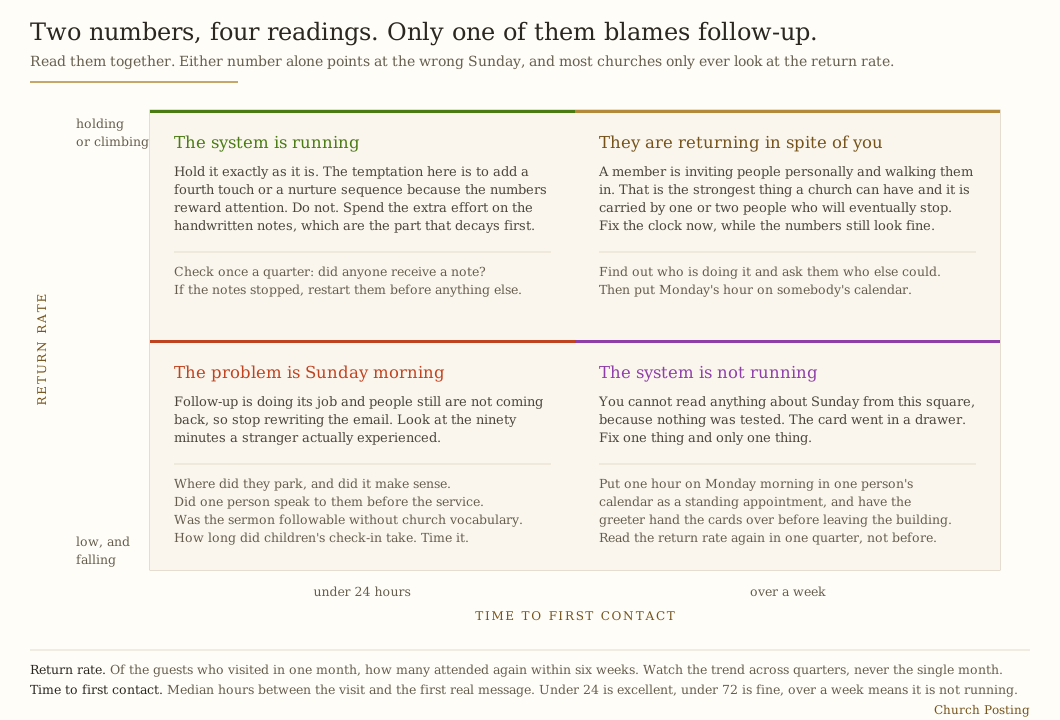
The two numbers that matter:
- Return rate. Of guests who visited in a given month, how many attended again within six weeks. If eight households visited in March and two came back by mid-April, the return rate is 25 percent. Watch the trend across quarters, not the single month.
- Time to first contact. Median hours between the visit and the first real message. Under 24 is excellent, under 72 is fine, over a week means the system is not running.
If the return rate is low and time to first contact is fast, the problem is Sunday morning, not follow-up. Look at the parking lot, the lobby, whether anyone spoke to the guest before the service, whether the sermon was comprehensible to somebody who does not know the vocabulary, and whether the children’s check-in took eleven minutes.
What to send, and what never to send
Send: the service time, the address, parking instructions, what happens with kids, what people wear, a link to a recent sermon, the pastor’s actual phone or email.
Never send: a donation link, a volunteer sign-up, a “we missed you” message to someone who visited once, an automated birthday email to someone who never gave you a birthday, or anything addressed to “Friend.” Never add a guest to the church-wide email list without asking. Adding them silently is how a church teaches a visitor that giving you an email address is a mistake.
Here is the Monday email, written the way the rule above asks. It runs four sentences, it names the passage, and it gives one door and a way to say stop.
Thank you for worshiping with us on Sunday. We read Philippians 2 together, and I was glad to see you there. We meet again at 10:30 this Sunday at 100 Main Street, with parking behind the building. If it would help, I am glad to answer questions over coffee, and if you would rather we not contact you again, reply with the word stop and we will take you off the list. Pastor Dan
A guest who gave a phone number and agreed to texts can get the same welcome as a text. Type one below and see how it reads on a phone, then use the consent rules in church texting rules before you send any.
Free tool you can try here
Text a guest after Sunday
Choose the guests and type the message. Free Church Texting sends it from one shared inbox, and only to people who agreed to texts.
Cedar Hill, shared inbox
Grace Baptist: Thank you for coming Sunday. We meet at 10:30 at 100 Main Street, parking behind the building. Reply STOP to stop.
Count us in!
We will be 10 minutes late.
The software is free. A church opens its own Twilio account and pays Twilio’s rates directly, and nothing is added.
Free Church Texting is Church Posting's own product.
The two rules with law behind them
The three touches above are courtesy. These two are not.
Email. Once a guest is on a bulk list, CAN-SPAM applies. The statute requires “a functioning return electronic mail address or other Internet-based mechanism, clearly and conspicuously displayed” for opting out, and makes it unlawful to keep sending “more than 10 business days after the receipt of such request.” It also requires a valid physical postal address in the message and bars a subject heading likely to mislead about the contents (15 U.S.C. 7704). The day-one email in this system is a personal message from the pastor and sits outside bulk mail, which is exactly why it works. The moment you paste that address into the newsletter tool, the rules attach, and the newsletter side of it is covered in a church newsletter needs six parts, one editor, and one deadline.
Texting. A phone number written on a guest card is not consent to be added to a text list. The FCC’s rules bar initiating an autodialed call or an artificial or prerecorded voice message without “the prior express consent of the called party,” and the carve-outs for tax-exempt nonprofits are narrower than churches assume: a nonprofit may make up to three calls in any consecutive 30-day period to a residential line without prior express written consent, and must honor opt-out requests (47 CFR 64.1200). Those provisions are written about calls to residential lines, not about mass texting to mobile numbers, so do not read them as a permission slip. Get an explicit opt-in on the card with a checkbox that says the church may text them, honor stop the first time, and keep the record. Church texting covers the consent language, and church texting services covers which platforms manage opt-outs for you.
The six week check
Once a quarter, sit with the last two quarters of the spreadsheet and read it out loud with an elder. Ask three questions:
- Which guests came back, and what do they have in common? Often it is the ones with kids in check-in, or the ones invited by a member rather than found on Google.
- Which guests did we fail to contact at all, and why did the process break that week?
- Did anyone receive a handwritten note? If the notes stopped, restart them before anything else.
Making it survive a volunteer change
Write the whole thing on one page: the Monday appointment, the email template, the note writer list, the spreadsheet location, the two metrics. Keep the guest spreadsheet in a church-owned account. When the volunteer rotates off, the replacement reads one page and starts Monday.
Guest follow-up fails when it lives in one person’s head. Written on one page, it survives the person who leaves.
Where the guests come from in the first place
This system converts visitors. It does not produce them. Pew Research Center found that among Americans looking for a new congregation, “seven-in-ten say they spoke with members of the congregation or to friends or colleagues about their decision,” and that 59 percent of adults under 30 used online searches in the process against 12 percent of those 65 and older (Pew Research Center, Choosing a New Church or House of Worship, 23 August 2016). A church with strong follow-up and no members inviting anyone will run this process on four cards a year.
Pair this with an honest count of who is in the room, using measuring attendance honestly, with the invitation language in church announcement examples, and with the slower neighborhood work in reaching a neighborhood without growth-industry tactics.
Sources
- 15 U.S.C. 7704, CAN-SPAM prohibitions, via Cornell Legal Information Institute. Checked 29 July 2026.
- 47 CFR 64.1200, delivery restrictions on telephone solicitation, via Cornell Legal Information Institute. Checked 29 July 2026.
- Planning Center pricing, Check-Ins free to 10 daily check-ins, People free with unlimited database. Checked 29 July 2026.
- Pew Research Center, Choosing a New Church or House of Worship. Checked 29 July 2026.
Nothing here is legal advice. Consent rules for text messaging are litigated constantly and vary by how the message is sent. Ask an attorney before you build a list.
Church Administrator jobs
Churches have 22 open church administratorjobs on Church Posting , including Events & Hospitality Administrator at The Vineyard Church of Central Illinois and Office Manager - Elgin at New Life Community Church .
More on outreach
All outreach articlesChurch Job Descriptions: How to Write One, With Templates
How to write a church job description: templates for pastor, youth, worship, kids, office and tech roles, with data from 379 postings read Oct. 19, 2026.
Church Job Interview Questions: Candidates and Committees
Interview questions for church jobs, for candidates and search committees, with questions by role, a score sheet and the facts postings leave out.
Church Staff Salaries 2026: Pastors and Every Other Role
What churches pay pastors, youth, worship, kids, office and media staff, from 379 job postings read Oct. 19, 2026, BLS wages and denominational surveys.
The weekly email
Join the list for the weekly email of new articles, free tools and job postings. It has not started sending yet.