
Church Data Security: Access, Backups and Breach Plans
Addresses, giving, children's allergies, and confessed sin. Four tiers of member data, who sees what, where counseling notes must never live, and the breach plan an elder board can write in an hour.
On this page
Give each worker access to the records their assigned work requires. Keep directory details separate from giving records, counseling notes and safeguarding reports. Limit financial records to authorized finance workers and restrict pastoral and safeguarding records to the leaders responsible for those cases. Review access when a person changes roles or leaves.
A church database knows where the widow lives alone, which child carries an epinephrine pen, which household gave $40,000 last year and which marriage nearly ended in March. Most congregations keep all of it in one system where four staff members share a password and nobody has looked at the permissions since the software was installed. The membership roll is a record of people under care, so how the church guards it is a pastoral decision as much as a technical one.
Sort what you hold into four tiers
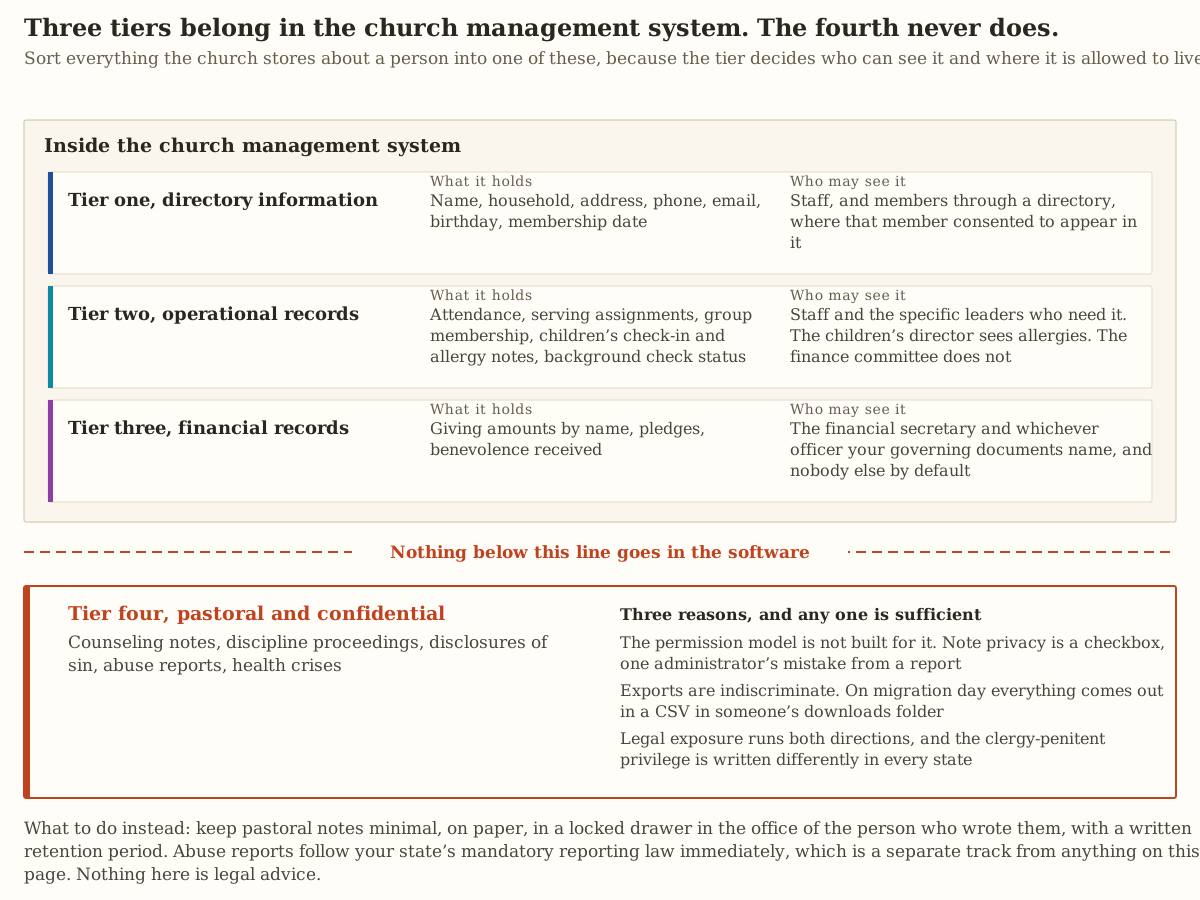
Everything the church stores about a person goes into one of four tiers, and the tier decides who can see it.
| Tier | What it holds | Who sees it |
|---|---|---|
| One, directory | Name, household, address, phone, email, birthday, membership date | Staff, and members who agreed to be listed |
| Two, operations | Attendance, serving, groups, children’s check-in and allergies, background check status | Staff and the leaders who need it. The children’s director sees allergies and the finance committee does not |
| Three, financial | Giving by name, pledges, benevolence received | The financial secretary and the officer your governing documents name |
| Four, pastoral | Counseling notes, discipline, confessions, abuse reports, health crises | A locked drawer, and never the software |
Tier one needs consent. A woman who left an abusive marriage has a reason to be unlisted, and she should not have to explain it to the church secretary. Here is a directory entry from the free directory maker. The family decided what shows, and the entry carries nothing more.
Free tool you can try here
Make a directory page
Type one family and see its entry. The real tool opens with that family at the top of your list.
This free tool is made by Church Posting.
Cedar Hill Baptist Church
Church directory
Brooks
Michael and Hannah
Ella, Sam
(417) 555-0191
The maker is free and keeps your list and photos in your browser.
Background check status belongs in tier two, and the report behind it does not. Under the National Child Protection Act, a state “may have in effect procedures” requiring qualified entities to request “a nationwide background check” on people who will have responsibility for children, and the Attorney General runs a program for qualified entities in states without such procedures (34 U.S.C. 40102). Use the route your state operates and ask what it returns. A criminal history summary on a volunteer is the most damaging file in the building if it leaks, so keep it in the locked place described in control nine below.
In tier three, many congregations keep the preaching elder out of giving records so that no sermon can be suspected of following the money. Your elders should make that call on purpose and write it down, because the software’s default will not make it for them.
Keep counseling notes out of the software
Counseling notes stay out of the church management system, including the notes tab, a custom field and any note marked private, and each of three reasons settles it.
Note privacy in most church software is a checkbox, and a checkbox is one administrator’s mistake away from showing up in a report, an export or a merged household record. The day you move to a new system, everything comes out in a spreadsheet that sits in someone’s downloads folder. Notes in a shared system are also harder to defend as confidential if a court asks what the church knew.
Clergy are mandatory reporters of child abuse in many states, and each state writes its clergy-penitent privilege differently. The Child Welfare Information Gateway keeps a state-by-state summary, Clergy as Mandatory Reporters of Child Abuse and Neglect, last published May 2023. Read your own state’s entry, ask an attorney in your state how the privilege and the reporting duty fit together for your church, and write your own policy, because this page is not legal advice.
Instead, keep pastoral notes minimal, on paper, in a locked drawer in the office of the person who wrote them, with a written retention period. An abuse report follows your state’s reporting law at once, on a separate track from everything here.
Twelve controls that cover most of the risk
None of these needs a consultant.
- Every person has their own login. Shared accounts make every action untraceable and outlast every staff departure.
- Turn on two-factor authentication for the church management system, the giving platform, the email account and the domain registrar.
- Keep passwords in a church-owned password manager with church billing and two administrators. A shared spreadsheet of passwords is the most common serious weakness in a church office.
- Write an offboarding checklist. The day someone leaves staff or rotates off a team, a named person removes their access from every system, and volunteers in children’s check-in are included.
- Review permissions each quarter by printing the user list, reading it aloud in a staff meeting and removing people, which takes ten minutes and always finds something.
- Register every account in the church’s name, including the website, the domain, the streaming channel, the social accounts and the Google or Microsoft account. An account in a personal address is one resignation from being lost.
- Set giving visibility in the software by policy so the question never comes up.
- Never store payment card numbers, including on paper authorization forms in a drawer. PCI DSS applies to “entities that store, process, or transmit cardholder data (CHD) and/or sensitive authentication data (SAD) or could impact the security of the cardholder data environment” (PCI Security Standards Council). Let the processor hold the numbers, and see what giving platforms cost when you choose one.
- Keep background check documents in one locked place with a retention period.
- Give children’s check-in data a purge schedule. Last year’s pickup codes have no use.
- Export the full database each quarter to encrypted church-owned storage, and once a year open the file and confirm the data is in it.
- Put a lock screen on the office laptop and the check-in tablets. A tablet left unlocked in a lobby holds your whole children’s roster.
Consent in one paragraph
Members should know what you collect and what you do with it. Put one paragraph on the website and in the membership packet that says what you collect, why, who inside the church can see it, what appears in the directory, whether the directory is printed or online, how to be excluded, how to correct a record and how to be removed after leaving.
Honor it once it is written. A visitor who fills out a prayer card has not joined the all-church email list, and adding them breaks trust and starts your opt-out duties under CAN-SPAM. The capture side is in a guest follow-up system one volunteer can run. Do not sell, trade or share the roll with anyone outside the church, including denominational bodies, without asking.
Get written parental permission before you publish a photograph of a child, and keep the list of families who said no where the person posting to social media will see it. COPPA’s definition of personal information does include “a photograph, video, or audio file where such file contains a child’s image or voice,” but its definition of a covered operator “explicitly excludes nonprofit entities that are exempt from Federal Trade Commission Act coverage” (16 CFR 312.2). The permission rule is therefore a promise the church makes to parents and keeps, and the practical workflow is in social media for a church with no media team.
The breach plan, written before you need it
Write one page, have the elders approve it and keep it where the office can find it. It has six lines, and their order is the content.
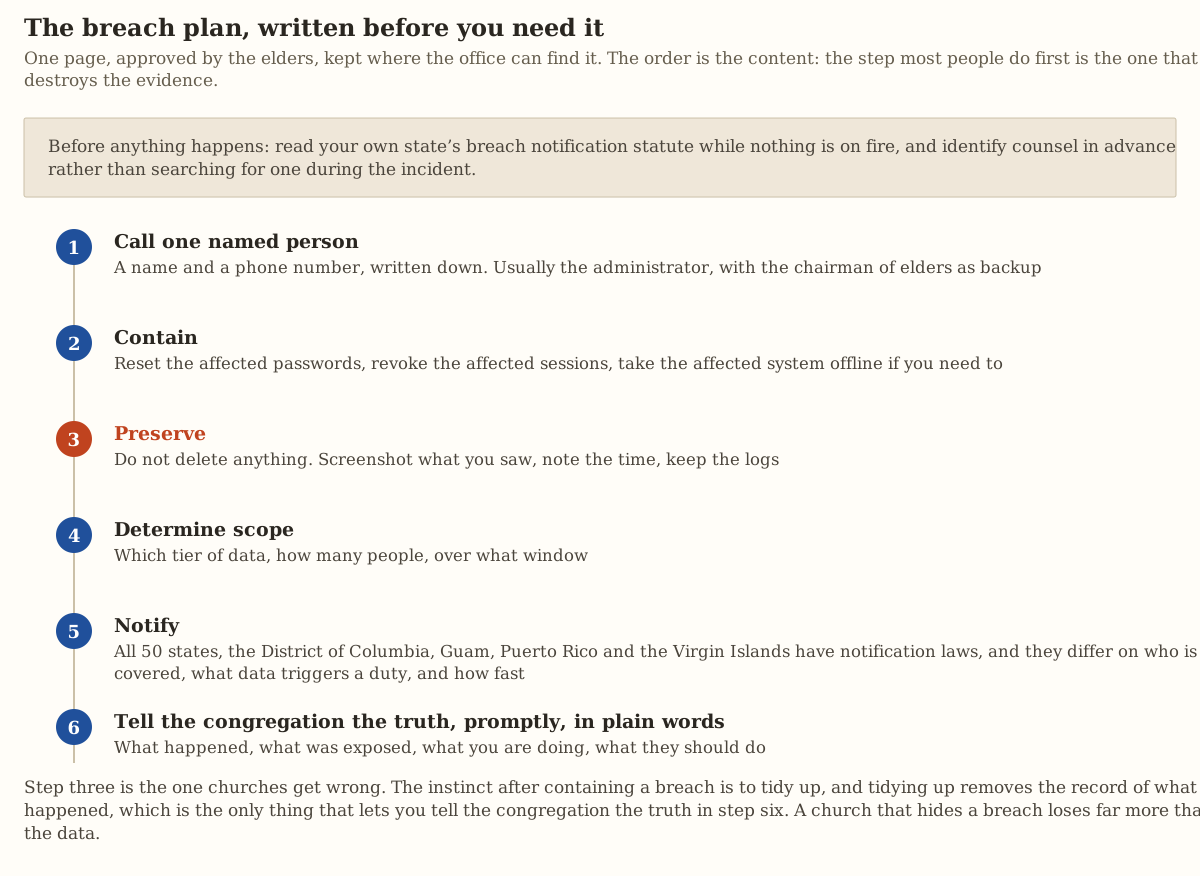
- Name one person with a phone number to call first, usually the administrator, with the chairman of elders as backup.
- Contain the problem by resetting the affected passwords, revoking the affected sessions and taking the affected system offline if needed.
- Preserve the evidence by deleting nothing, screenshotting what you saw, noting the time and keeping the logs.
- Determine the scope, meaning which tier of data, how many people and over what window.
- Notify the people affected. “All 50 states, the District of Columbia, Guam, Puerto Rico and the Virgin Islands have laws requiring private businesses, and in most states, governmental entities as well, to notify individuals of security breaches” (National Conference of State Legislatures). The statutes differ on who is covered, what data triggers a duty and how fast you must act, so read your own state’s statute now and name your counsel in advance.
- Tell the congregation what happened, what was exposed, what you are doing and what they should do, promptly and in plain words.
Where this leads
A church asks its people to be known. The elders keep a list with your name on it, someone notices when you are absent and your household is under care. That works only when the church is trustworthy with what it learns, so set the permissions this month.
For the office systems these records live in, start with choosing church management software and its export test, since a system you cannot export from is a system you cannot audit. On free tiers, free church management software says where each one stops, which matters because permission controls are often the first thing a free tier withholds. For the domain and account half of this, see website options for a small church, and for counting attendance without keeping names longer than needed, see average attendance hides whether your church is growing or shrinking.
Sources
- 34 U.S.C. 40102, National Child Protection Act background checks, via Cornell Legal Information Institute. Checked 29 July 2026.
- Child Welfare Information Gateway, Clergy as Mandatory Reporters of Child Abuse and Neglect, published May 2023. Checked 29 July 2026.
- 16 CFR 312.2, COPPA definitions, via Cornell Legal Information Institute. Checked 29 July 2026.
- PCI Security Standards Council, PCI DSS, who must comply. Checked 29 July 2026.
- National Conference of State Legislatures, Security Breach Notification Laws. Checked 29 July 2026.
CISA’s multi-factor authentication resource page returned HTTP 403, so control two above cites no risk-reduction percentage, and you should turn on two-factor anyway.
Church IT Director jobs
Churches have 11 open church it directorjobs on Church Posting , including Systems Administrator at Dream City Church and Technology Administrative Support at Gateway Church .
More on software
All software articlesClergy housing allowance: how it works and what the church has to do
How a minister's housing allowance works under IRS Publication 517: the three limits on it, the designation a church makes in advance, Social Security and Medicare tax, and the pastor's W-2.
Church live streaming: three setups, the equipment for each and where to send the stream
How to stream a church service with a phone, one camera or several, with the sound feed, the internet speed YouTube asks for, the song license, and two streaming services' prices read October 13, 2026.
Online giving for churches: what each platform costs in fees
Fees read October 13, 2026 for Planning Center, Tithely, Givelify, Subsplash, Anedot, Zeffy and Stripe, worked out in dollars for a church that receives $100,000 a year in online gifts.
The weekly email
Join the list for the weekly email of new articles, free tools and job postings. It has not started sending yet.