
Sermon Clip Tools: Prices and Export Options
Compare sermon clip tools by price, export options and rights to your clips, with vendor prices checked July 29, 2026.
Every price here was read off the vendor's own page on July 29, 2026.
On this page
- What four sermons a month costs
- What we did not test, and why that should change how you read every review of these tools
- The minute cap is the specification that decides the purchase
- Sermon Shots, priced and reviewed
- Pulpit AI, priced, and who owns it
- Pastors.ai, and the free tier that is genuinely usable
- Sermon Clips, and what a founding offer means
- The general clippers: OpusClip, Choppity, Vizard
- Descript and Riverside are different tools wearing the same category label
- Does it caption accurately on theological vocabulary
- Will it handle a 45 minute sermon
- Who owns the clips
- The decision
Compare sermon clip tools by upload allowance, export quality, editable captions and rights to the finished clips. Count the full sermons you upload each month before choosing a plan. The comparison below retains its July 29, 2026 price check; confirm today’s allowance and price on the linked vendor page before paying.
A church signs up for a sermon clip tool on a Sunday night, uploads a 45 minute message, and finds out on the third upload of the month that the plan is spent. The limit that bites is the minutes. Three of the plans priced on this page cannot process four 45 minute sermons in a calendar month, and one of them stops at exactly 180 minutes, which is four sermons and not one second more.
That is the number this whole category hides. Every vendor advertises unlimited clips. Almost none of them advertise the ceiling on the thing the clips are cut from.
Every price below was read off the vendor’s own pricing page on 29 July 2026 and is linked at the claim. Where a vendor publishes no number, this page says so instead of filling the gap. Our method is on how we review.
What four sermons a month costs
Take the ordinary case. One service a week, a 45 minute sermon, four sermons in a month, and somebody who wants two or three vertical clips out of each one.
- OpusClip Pro annual billing. Credits run out before eight
- Descript Creator you find and cut every clip yourself
- Pastors.ai Pastor plan to five sermons, then Team
- Pulpit AI Basic to five uploads, then Standard
- Sermon Shots Plus flat to 600 minutes a month
Prices read off each vendor's pricing page on 29 July 2026, at the lowest published rate, which means annual billing where a vendor offers it. Three of these numbers are arithmetic rather than a printed figure and the arithmetic is shown in the sections below: Pulpit AI at $35.10 is its published $421.20 annual total divided by twelve, Pulpit AI at $53.10 is its $637.20 Standard total divided by twelve, and OpusClip at $14.50 is its published $174 annual total divided by twelve. OpusClip has no value at eight sermons because eight 45 minute sermons a month is 4,320 minutes a year against a 3,600 credit annual pool, and the price of a second credit pack does not render on the page. These lines are not like for like. Descript at $24 buys you a professional editor and no help choosing the clip.
See the numbers
| Vendor | 1 sermons | 2 sermons | 4 sermons | 8 sermons |
|---|---|---|---|---|
| OpusClip Pro | $14.5 | $14.5 | $14.5 | not offered |
| Descript Creator | $24 | $24 | $24 | $24 |
| Pastors.ai | $30 | $30 | $30 | $75 |
| Pulpit AI | $35.1 | $35.1 | $35.1 | $53.1 |
| Sermon Shots Plus | $39.99 | $39.99 | $39.99 | $39.99 |
Three things fall out of that shape, and none of them is on any page currently ranking for this query.
The church-specific tools cost two to three times the general ones at the volume a normal church runs. OpusClip Pro is $14.50 a month on annual billing. Sermon Shots Plus is $39.99 on annual billing. Both will process four 45 minute sermons a month. The gap of $25.49 a month is $305.88 a year, our multiplication, and it buys one thing: somebody else decides which 40 seconds of the sermon get cut.
The curve is flat until it is a cliff. Nothing changes between one sermon and four on any of these plans. Everything changes at five, because that is where Pulpit AI’s Basic tier and Pastors.ai’s Pastor tier both stop. A church with a Sunday morning service, a Sunday evening service and a midweek study is a five-upload church before it has done anything unusual.
Sermon Shots is the only line that does not move. Its three paid tiers all carry the same “10 Hours Of Video Uploads Per Month” allowance, read off its pricing page on 29 July 2026. Ten hours is 600 minutes, which is thirteen 45 minute sermons. At eight sermons a month it is the cheapest church-specific option on the chart, and at one sermon a month it is the most expensive.
What we did not test, and why that should change how you read every review of these tools
We did not run a sermon through these tools. Not one of them.
That matters, so here is exactly what is missing as a result. We cannot tell you how many of the clips a tool returns are usable. We cannot tell you its word error rate on Ezekiel, propitiation, Melchizedek or the name of your pastor. We cannot tell you whether the automatic vertical crop keeps the preacher in frame when he walks the platform, or whether it locks onto the pulpit and holds a shot of an empty stage for eleven seconds. We cannot tell you how long a 45 minute upload sits in a queue on a Sunday night when every church in America is uploading a 45 minute file. Those five things decide whether a subscription was worth the money, and not one of them is in this page.
What this page has instead is the part vendors and affiliates will not publish: the current price, the metering unit, the ceiling, and the clause in the terms that says what happens to your sermon after you upload it. Every one of those is checkable against a URL and a date.
Read the rest of this category with that division in mind. When a review says a tool produced “high quality, ready to post clips” and prints no clip count, no rejection count and no transcript diff, that review did not test the tool either. When a comparison page ranks eight tools and belongs to one of the eight, the ranking is a sales asset. Sermon Clips runs eight of those comparison pages off its own footer, including one against Sermon Shots and one against OpusClip, read 29 July 2026. Worth reading, and not evidence.
The honest test is one a church can run in an afternoon: take last Sunday’s file, put it through two free tiers, and count how many clips you would post. Two of the tools below give away enough free processing to do exactly that, and a free tier is the only review that is about your preacher, your room and your microphone.
The minute cap is the specification that decides the purchase
Nine tools, nine different units of account. Sermon Shots meters upload hours. Pulpit AI meters sermon uploads. Pastors.ai meters sermons a month. OpusClip and Vizard meter credits, where one credit is one minute. Choppity meters hours of AI analysis. Descript meters media minutes. Riverside meters recording hours, which is not the same thing at all.
Convert all of them into minutes of sermon per month and the picture resolves.
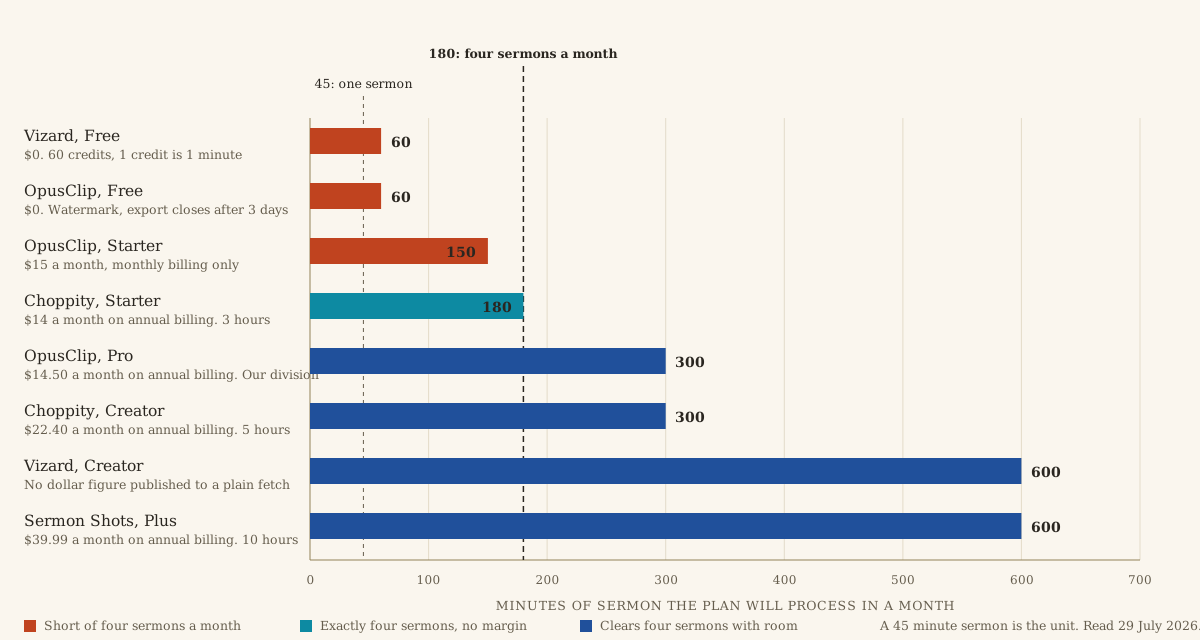
The three bars short of the line are the three plans a church is most likely to try first, because two of them are free and the third is the cheapest plan any of these tools will sell on monthly billing.
OpusClip’s free tier gives 60 credits a month, read 29 July 2026, and one credit is one minute. That is one 45 minute sermon with 15 minutes to spare, and the clips carry a watermark, and the page states plainly that “After 3 days, the clips will no longer be exportable.” A church that uploads on Sunday and gets to social media on Thursday has lost the work. Vizard’s free tier is also 60 credits a month, read 29 July 2026, with a three day storage window, 720p exports, and an export length capped at ten minutes. OpusClip’s Starter plan at $15 a month carries 150 credits, which is three 45 minute sermons and not four.
Choppity’s Starter plan is $20 a month, or $14 a month on annual billing, for three hours of AI analysis, read 29 July 2026. Three hours is 180 minutes. Four 45 minute sermons is 180 minutes. There is no headroom in that plan for a re-run after a bad first pass, and a bad first pass is normal. Choppity’s Creator tier at $32 a month, or $22.40 annually, moves you to five hours, and its Team tier at $48 a month carries the same five hours with more seats, so the extra $16 buys collaboration rather than capacity.
Measure your own sermon, not the service, before you sign anything. A preacher who runs 55 minutes needs 220 minutes a month across four Sundays and is outside Choppity’s Starter tier before the first upload.
Sermon Shots, priced and reviewed
Sermon Shots publishes four tiers, read 29 July 2026. Free gives two clips and the page says “We Create Them For You”. Plus is $49.99 a month on monthly billing, or $39.99 a month on annual billing with the total printed as “*paid yearly ($479.88)”. Silver Suite is $67.00 monthly or $57.00 annually, printed as $684.00 a year. Gold Suite is $97.00 monthly or $87.00 annually, printed as $1,044.00 a year. Every one of those annual totals is exactly twelve times the annual monthly rate, which is worth checking because a vendor’s own arithmetic is the cheapest thing in the world to get wrong.
All three paid tiers carry the same 10 hours of upload a month. The higher tiers add output types, and the hours stay the same. Silver adds shareable sermon pages, discussion guides, summaries, a blog post generator, quote images, thumbnails and social carousels. Gold adds text translations. If your church will never send a five day devotional, Silver’s extra $204 a year buys features you will not open.
What it is bad at. The terms are silent on the thing a church should care about most. Sermon Shots’ terms and conditions run 29 numbered sections, read 29 July 2026, and the words license, intellectual property, retain and train do not appear once. There is no clause stating who owns the uploaded sermon, no clause stating who owns the clips that come back, and no clause about model training. Its privacy policy, read the same day, is written entirely about Personal Data and never mentions artificial intelligence, machine learning or training either. A church whose pulpit recording is its most sensitive media asset is uploading it under an agreement that does not address the recording.
Silence is worse than a bad clause in one specific way: a bad clause can be read and refused, while silence has to be resolved by email with a vendor, and the answer is not binding on anybody.
Pulpit AI, priced, and who owns it
Pulpit AI publishes three tiers plus a free trial, read 29 July 2026. Basic is $39 a month with 5 sermon uploads and an annual price of $421.20. Standard is $59 a month with 10 uploads and an annual price of $637.20. Pro is $129 a month with 25 uploads and an annual price of $1,393.20. The free trial gives 2 uploads with no card.
Divide those annual totals by twelve and you get $35.10, $53.10 and $116.10 a month, which is a flat ten percent off the monthly rate on all three tiers. That division is ours, not a figure printed on the page, and it is the number used in the chart above.
The metering here is per sermon rather than per minute, which is the right unit for a church and the reason Pulpit AI reads as the most church-native pricing page in the category. A 20 minute sermon and a 70 minute sermon cost the same.
Pulpit AI has a named owner. Pulpit AI’s terms of service open by stating “This Service is owned and operated by Subsplash, Inc.”, read 29 July 2026. Pulpit AI is a Subsplash product. Subsplash markets the pairing on its own site as an integrated media workflow, read the same day. That changes what you are evaluating. You are not comparing an independent startup against Sermon Shots, you are comparing the sermon-content front end of a large church media platform against Sermon Shots, and the pricing and roadmap of the front end will follow the platform’s interests.
The same document grants Subsplash an “unrestricted, unlimited, irrevocable, perpetual, non-exclusive, transferable, royalty-free, fully-paid, worldwide right, and license” over what it calls Contributions, and elsewhere states that you “retain full ownership of all of your Contributions and any intellectual property rights”. Both sentences are in it. They are not contradictory, because Contributions is defined against “blogs, message boards, online forums, and other functionality”, which is generator boilerplate that does not distinguish a sermon upload from a forum comment. Model training is not named anywhere.
Pastors.ai, and the free tier that is genuinely usable
Pastors.ai publishes three tiers, read 29 July 2026. Free is $0 a month for 3 sermons with 4 clips a sermon, watermarked, delivered by Tuesday. Pastor is $30 a month for 5 sermons with 8 clips a sermon and no watermark, delivered by Monday. Team is $75 a month for 20 sermons with 20 clips a sermon, delivered by Sunday. No annual rate is published. The workflow is a YouTube link in and an email out in about 30 minutes.
Three free sermons a month with clips, a branded sermon page, a devotional and a study guide is the most generous free tier in this category by a wide margin, and for a church posting one clip a week it may be the whole answer. The watermark is the cost.
On ownership, this is the clearest document of the nine. Pastors.ai states in its terms that “You retain ownership of your original sermon content” and “You own the AI-generated resources created from your content”, read 29 July 2026, and grants only “a limited license to process your content and generate derivative resources”. It reserves the right to use aggregated, anonymized data for service improvement and claims no training rights beyond that. Two sentences of plain English answer the question three other vendors leave open.
Sermon Clips, and what a founding offer means
Sermon Clips prices at $99 a month standard, $49 a month as a “Founding Pastor” rate described as locked in for life, and $15 a week as a pass, read 29 July 2026, with one free sermon to trial. The pitch on the page is unlimited sermons and unlimited clips, and it claims the AI clip selection is “trained on sermons, not TikToks”.
Its own page does the honest arithmetic on the weekly pass: four weeks runs about $65, so the pass costs more than the monthly rate for a church that clips every week and is worth taking only to prove the tool on your own sermons.
What to be careful about. A grandfathered rate is a real discount and a commitment device at the same time. $49 a month is $588 a year and $99 a month is $1,188 a year, both our multiplication rather than figures on the page. Six plans priced here cost more than $588 over a year: Pulpit AI Standard at $637.20 and Pro at $1,393.20, Sermon Shots Silver at $684 and Gold at $1,044, Pastors.ai Team at $900 on twelve monthly payments, and Descript Business at $600 on annual billing. Only Pulpit AI Pro costs more than $1,188. The lock-in pays off only if you are still publishing clips in year three, and most churches that buy a clip tool are not.
We did not read the Sermon Clips terms of service this run, so its ownership and training columns in the download below say so rather than guessing.
The general clippers: OpusClip, Choppity, Vizard
These three do not know what a sermon is, and they cost less than the ones that do.
OpusClip publishes a free tier at 60 credits a month, Starter at $15 a month with 150 credits and monthly billing only, and Pro at $29 a month or $174 billed annually with 3,600 credits a year, read 29 July 2026. Its clip length selector offers 0 to 1, 1 to 3, 3 to 5, 5 to 10 and 10 to 15 minutes on every tier, and Pro adds the 1:1 and 16:9 ratios alongside 9:16. Pro also takes local files up to 30GB, which matters, because a 45 minute service export at a sensible bitrate is a large file and the Free and Starter tiers cap at 10GB.
One Pro feature is worth the whole upgrade for a church, and it is buried in the comparison table rather than advertised: brand vocabulary. A custom word list is the only lever any of these tools give you over the transcription of proper nouns, and OpusClip puts it on Pro and nowhere below.
Choppity’s tiers are Free at one hour, Starter at $20 monthly or $14 annually for three hours, Creator at $32 or $22.40 for five hours, and Team at $48 or $33.60 for five hours with unlimited seats, read 29 July 2026. Its home page claims it will “Generate 97%+ accurate subtitles in seconds”, read the same day.
Vizard publishes a feature comparison but served no dollar figure at all when we fetched it on 29 July 2026. Every price on the page rendered as $0, with a “50% OFF” badge beside it, because the figures are filled in by script after the page loads. The feature table is real: Free gives 60 credits, a 60 minute upload ceiling, 720p export, a 10 minute export cap and three day storage; Creator and Business give from 600 credits, a 600 minute upload ceiling, 4K, any export length and 100GB of storage. We are not publishing a Vizard price we could not read, and a comparison page that prints one without saying where it came from should be treated accordingly.
Descript and Riverside are different tools wearing the same category label
Descript prices at $0 for 60 media minutes a month, $24 a month or $16 annually for Hobbyist at 600 minutes, $35 or $24 for Creator at 1,800 minutes, and $65 or $50 for Business at 2,400 minutes, read 29 July 2026. That is by far the largest processing allowance on this page and Creator at $24 a month on annual billing is cheaper than every church-specific tool here.
What you do not get is the choosing. Descript is a transcript-driven editor: it transcribes a 45 minute sermon and lets you cut by deleting words, which is the fastest manual workflow that exists, and it hands you no candidate clips on a Monday morning. For a church with one person who enjoys editing, that is the correct purchase. For a church without that person, it becomes a $288 a year unused login, which is the most common failure in this category.
Descript is also the only vendor here that states its training position outright. Its terms say you “own all right, title, and interest in and to any Input and Output”, read 29 July 2026, and in the same section reserve the right to access and use your Input and Output to “train, improve, and develop its models and technologies (unless you have opted out of such use)”. You are told, and you are given a switch. Compare that against a document that says nothing and decide which you would rather sign.
Riverside prices at $0 for two one-off recording hours, $29 a month or $24 annually for Pro at five recording hours a month, and $39 or $34 for Grow at 20 hours, read 29 July 2026, with Magic Clips on every tier including free. It is a recording studio for remote interviews that also clips. Your sermon already exists as a file, recorded by the gear in the church live streaming setup, so you would be paying for a studio you do not use. Skip it unless the church also records a two-host podcast.
CapCut’s own tool page for turning long recordings into short clips describes automatic highlight identification, subtitles and support for 20 or more languages, read 29 July 2026. We publish no CapCut price, because its /pricing path returned a 404 and its own machine-readable site index at capcut.com/llms.txt lists no pricing page at all, checked the same day. The free desktop editor is a real answer for a church willing to do the work by hand, and it is the answer we cannot price.
Does it caption accurately on theological vocabulary
Nobody knows, including the vendors, and the number they print is not an answer.
OpusClip’s church page states that “OpusClip automatically adds captions for you with over 97% accuracy”, read 29 July 2026. Choppity claims 97 percent or better on its home page. Neither states a test set, a language, a speaker, an audio condition, or what counts as an error. A 97 percent claim with no denominator is marketing.
Do the arithmetic anyway. A preacher at an ordinary pace of about 130 words a minute produces roughly 5,850 words in 45 minutes, so a three percent error rate is about 175 wrong words in one sermon. That is our arithmetic on an assumed speaking rate, stated so you can substitute your own. What matters is which 175 words went wrong. Three percent spread evenly across function words is invisible. Three percent concentrated on names is a caption that reads “the profit Isaiah” under a clip you posted on Instagram.
There is a reason to expect the errors to land there. OpenAI’s model card for Whisper, the open speech recognition model behind much of this category, states that predictions “may include texts that are not actually spoken in the audio input (i.e. hallucination)”, that the model shows “disparate performance on different accents and dialects”, and that it is “prone to generating repetitive texts”, read 29 July 2026. Proper nouns, transliterated Hebrew and Greek, and the names of your members are the low-frequency tokens a general model has least evidence for. No vendor here publishes a word error rate on religious vocabulary, and we did not measure one either.
The only control any of these tools offers you is a custom word list, and only OpusClip’s Pro tier advertises one. Everywhere else the fix is manual: read every caption before it goes out. Build that into the workflow described in social media without a media team and treat any tool that hides the caption text behind a rendered file as unusable, because a caption you cannot read before publishing is a caption you will publish wrong.
Will it handle a 45 minute sermon
Volume is the limit that bites.
Every paid tier on this page will ingest a 45 minute file. Vizard’s free tier caps the upload at 60 minutes and the export at 10 minutes, which is fine for a sermon and fine for a clip. OpusClip’s clip length selector tops out at the 10 to 15 minute band on every tier. Google’s own documentation defines a Short as a vertical video up to 3 minutes long at up to 1080p, read 29 July 2026, so the ceiling that matters for distribution sits well below every tool’s ceiling.
What breaks is the monthly total, and it breaks in the second month rather than the first, once the church has learned to re-run a bad pass. Budget two attempts per sermon. Four sermons at 45 minutes with one re-run each is 360 minutes, which clears exactly two of the eight plans in the figure above.
Who owns the clips
Two questions hide inside that one, and they have different answers.
The first is contractual, and the terms answer it. Pastors.ai says you own the generated resources. Descript says you own the Input and the Output and tells you about training with an opt-out. Choppity, operated by Mizko Media Pty Ltd, states “We will never claim ownership of your content but we do require a license from you in order to use it”, read 29 July 2026, and adds that the license you grant ends when you delete the content or the account, except where the content has already been used in commercial or sponsored material. OpusClip’s terms state that your “ownership in User Submissions is not affected”, read the same day, while its privacy policy grants an opt-out from AI research and model development only to users “based in the European Union or European Economic Area”. A church in Ohio is not offered that switch. Sermon Shots says nothing at all.
The second question is about copyright in the clip itself, and no vendor decides it. The sermon is a human-authored work and the recording belongs to whoever made the recording. What the tool adds is machine output. The United States Copyright Office’s registration guidance states that “copyright can protect only material that is the product of human creativity” and that “if a work’s traditional elements of authorship were produced by a machine, the work lacks human authorship and the Office will not register it”, published at 88 Fed. Reg. 16,190 on 16 March 2023 and read on 29 July 2026. The same guidance places a duty on an applicant to disclose AI-generated content and explain the human author’s contribution, and the Office keeps its current material at copyright.gov/ai. None of that threatens a church’s rights in its own sermon. It does mean the machine’s contribution, the automatic crop and the generated caption styling, is not the church’s authorship to claim, and a compilation of clips submitted for registration carries a disclosure.
Where this bites is storage and retention rather than copyright, and the controls for that are the same ones in protecting member data. A sermon recording with a congregation visible in the wide shots is member data with faces in it.
The decision
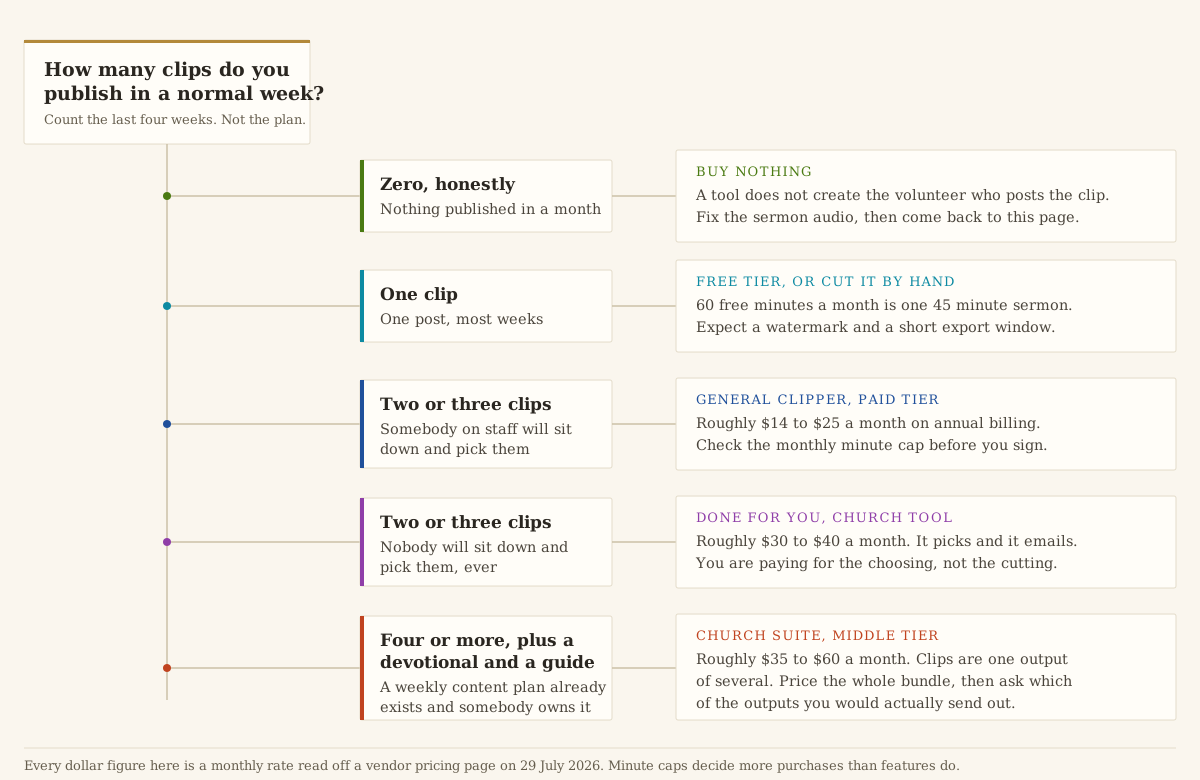
Count what you published in the last four weeks. That number decides this.
If it was zero, buy nothing. No tool on this page creates the person who posts the clip. Spend the $480 a year on the sound desk feed instead, because a clip of a sermon that sounds like a voice in a stairwell will not be watched at any caption accuracy. The audio chain is in the church live streaming setup and the gear that feeds it is in the camera guide.
If it was one a week and somebody enjoys the work, run Pastors.ai Free and OpusClip Free side by side on last Sunday’s file this week. Three sermons a month with clips and a study guide, against 60 minutes of processing and a three day export window. Post the better output for a month, then pay for whichever one you opened. That comparison costs nothing and it is worth more than this page, because it is about your preacher.
If it was two or three a week and nobody will choose the clips, pay for the choosing. Pastors.ai Pastor at $30 a month is the cheapest unwatermarked done-for-you tier here and its terms are the clearest of the nine. Sermon Shots Plus at $39.99 on annual billing buys ten hours a month of headroom and a vendor whose terms do not address your sermon at all, which is a real cost even though it is not a dollar cost.
If your church already runs a weekly content plan with a devotional and a small group guide in it, price Pulpit AI Standard at $59 a month against Sermon Shots Silver at $67, and go in knowing Pulpit AI is a Subsplash product. Both are bundles. Write down which outputs you will send before you compare them, and ignore the ones you will not.
If your church has a volunteer who wants to edit, buy Descript Creator at $24 a month on annual billing and nothing else. It is the cheapest plan on this page with real capacity, you keep the ownership language in writing, and the opt-out from training exists. The whole risk is that the volunteer leaves, and training a second person is the answer to that, not another subscription.
Take the numbers with you. The sermon clip tool comparison CSV has one row per plan across all nine tools: both prices, the annual total, the metering unit, the monthly allowance, whether it clears four 45 minute sermons, the ownership clause, the training clause, the date each price was read, and the URL it was read from. Where a field says “not read this run”, that is what happened. Re-check the prices before you sign, because the last version of this page quoted a figure Sermon Shots has since restructured, and that is what every page in this category is one quiet vendor update away from.
If you want the wider software budget this sits inside, it is in what church software costs. A clip tool is the smallest line in it and the one most likely to be cancelled in month five.
Pages cited
- Pricing, Sermon Shots. Read July 29, 2026.
- Terms & Conditions, Sermon Shots. Read July 29, 2026.
- Privacy Policy, Sermon Shots. Read July 29, 2026.
- Pricing, Pulpit AI. Read July 29, 2026.
- Terms of Service, Pulpit AI. Read July 29, 2026.
- Pricing, Pastors.ai. Read July 29, 2026.
- Terms of Service, Pastors.ai. Read July 29, 2026.
- Pricing, Sermon Clips. Read July 29, 2026.
- Pricing, OpusClip. Read July 29, 2026.
- AI Video Clipping for Churches, OpusClip. Read July 29, 2026.
- Privacy Policy, OpusClip. Read July 29, 2026.
- Terms of Service, OpusClip. Read July 29, 2026.
- Pricing, Choppity. Read July 29, 2026.
- Terms of Use, Choppity. Read July 29, 2026.
- Pricing, Vizard. Read July 29, 2026.
- Pricing, Descript. Read July 29, 2026.
- Terms of Service, Descript. Read July 29, 2026.
- Pricing, Riverside. Read July 29, 2026.
- Convert Long Video to Short Clips, CapCut. Read July 29, 2026.
- Whisper model card, OpenAI. Read July 29, 2026.
- Copyright Registration Guidance: Works Containing Material Generated by Artificial Intelligence, United States Copyright Office. Read July 29, 2026.
- Copyright and Artificial Intelligence, United States Copyright Office. Read July 29, 2026.
- Create Shorts on YouTube, Google. Read July 29, 2026.
Church Media Director jobs
Churches have 52 open church media directorjobs on Church Posting , including Palmer Production Associate at Alliance Christian Fellowship and Production Associate at Alliance Christian Fellowship .
More on software
All software articlesClergy housing allowance: how it works and what the church has to do
How a minister's housing allowance works under IRS Publication 517: the three limits on it, the designation a church makes in advance, Social Security and Medicare tax, and the pastor's W-2.
Church live streaming: three setups, the equipment for each and where to send the stream
How to stream a church service with a phone, one camera or several, with the sound feed, the internet speed YouTube asks for, the song license, and two streaming services' prices read October 13, 2026.
Online giving for churches: what each platform costs in fees
Fees read October 13, 2026 for Planning Center, Tithely, Givelify, Subsplash, Anedot, Zeffy and Stripe, worked out in dollars for a church that receives $100,000 a year in online gifts.
The weekly email
Join the list for the weekly email of new articles, free tools and job postings. It has not started sending yet.